Full game metadata
| Field | Value |
|---|---|
| Steam app type | game |
| Steam App ID | 3287360 |
| Live current players | 0 |
| SteamPulse tracked peak | 0 |
| Live count (today's peak floor) | 0 |
| Price | $6.00 |
| Free to play | No |
| Discount | 0% |
| Original price USD | $6.00 |
| Current price USD | $6.00 |
| Release date | Q2 2026 |
| Developer | GoldenBlade |
| Publisher | GoldenBlade |
| Owners estimated | Not available |
| SteamSpy owner estimate minimum | Not available |
| SteamSpy owner estimate maximum | Not available |
| Review type | No user reviews |
| Positive review percent | Not available |
| Positive reviews | 0 |
| Negative reviews | 0 |
| Total reviews | 0 |
| Steam recommendations | Not available |
| Achievements | 20 |
| Average playtime forever | Not available |
| Windows support | Yes |
| macOS support | Yes |
| Linux support | No |
| Parent game | Not available |
| Store URL | https://store.steampowered.com/app/3287360/ |
Short description
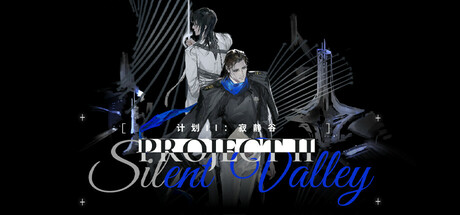
Project II: Silent Valley is a linear, semi-open world dystopian visual novel with card combat and explore. Play as US Navy Officer Hierophan, joining the docile humanoid weapon Osprey to uncover a conspiracy at the underwater base "Silent Valley" and the hidden truths of his missing friend, Ochira.
About this game
Project II: Silent Valley is part of the experimental 计划 Projects series, which consists solely of Chicago Project and Project II: Silent Valley . Both are standalone narratives, and no knowledge of the other title is required to play this game. If characters or names from 计划 Projects appear again in other works by the creator, they should be regarded as separate reinterpretations. Basic Controls E / Right Mouse Button : Interact / Talk E has a larger interaction detection range Right Mouse Button has a smaller interaction detection range Left Mouse Button : Confirm / Advance Dialogue ESC : Exit Current Screen / System Menu M : Open Game Menu CG/Video Playback Optimization You can now choose from three different Windows video playback modes in Settings , allowing you to switch based on your device configuration: Default / Media Foundation : The recommended default option. Supports hardware decoding and generally provides good performance and compatibility on most Windows devices. Compatibility / DirectShow : A traditional Windows playback mode that may offer better compatibility with certain video formats or codec environments. If you encounter playback issues with the default mode, try this option. Streaming / WinRT : A newer Windows playback mode with better support for streaming media. You can also try this option if the default mode causes stuttering or compatibility issues. If videos in the game experience noticeable stuttering, black screens, or other playback issues , we recommend switching to a different playback mode in Settings to find the option that works best for your device. In this dystopian parallel America, the “Nodomain Consortium (N.C.)” has overthrown the traditional government. The current United States is divided between two major powers: the militarized "N.C. Government," which controls most regions with an iron grip, and the remnants of the former regime, known as the "Old Government." Beneath the surface of peaceful coexistence, a fierce power struggle is intensifying… In this world dominated by alienation and authoritarianism, how will you, as a reformist, make your choices? A visually striking near-future aesthetic A c…
Supported languages
English * , Simplified Chinese * languages with full audio support